Baby tracker - feeding, sleep
- 4.9
- Rating
- 1.00M
- Installs
- Free
- Price

 Analysis by App-foxy
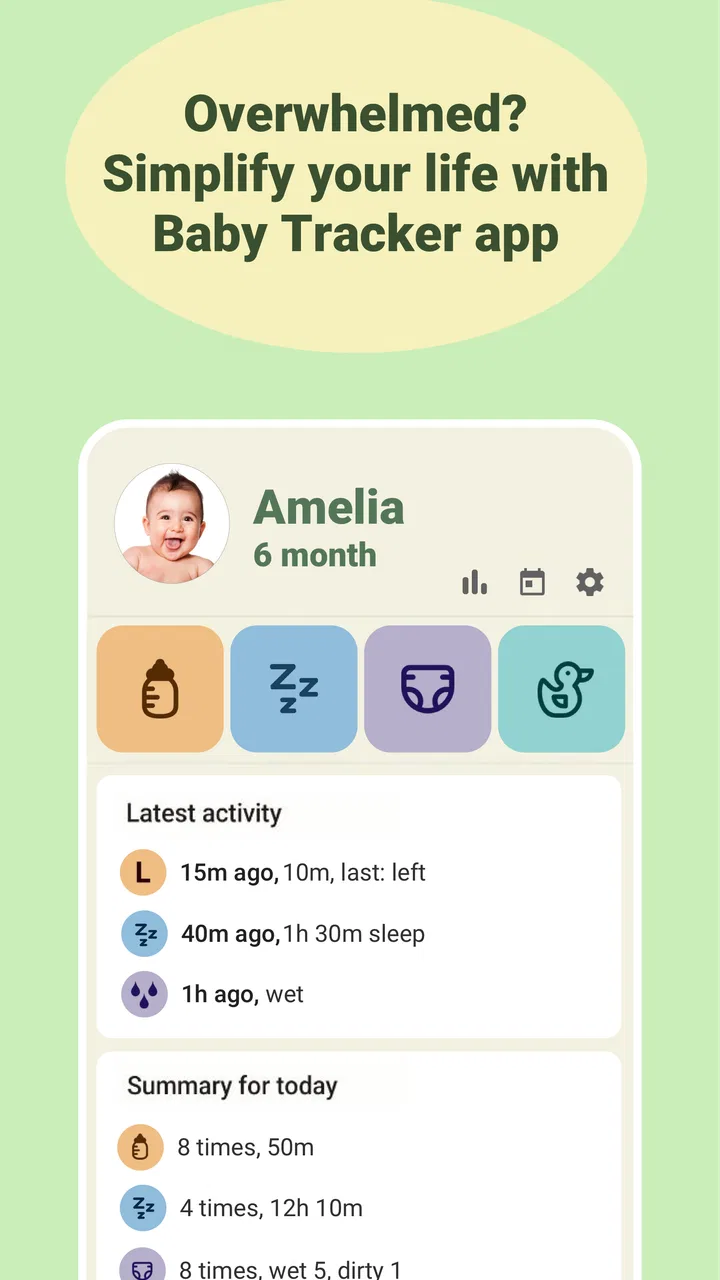
When caring for a baby, the difficult part is often not noticing what happened but remembering when it happened. A feed begins while I am tired, a nap ends during a busy afternoon, and suddenly I am trying to reconstruct the day from memory. Baby tracker - feeding, sleep approaches that problem with a focused purpose: it is a parenting app from Amila for recording breastfeeding and sleep routines in one place. After using it as a practical log rather than treating it like a medical tool, I found that its main value is reducing mental clutter.
The app is free to download and is rated for Everyone, which makes its basic concept approachable for new parents and families sharing care. It has built a strong public reputation, with a 4.9 average from around 130 thousand ratings, more than a million installs, and roughly 9.1 thousand written reviews. Those figures do not replace personal judgement, but they do suggest that the simple tracking idea has connected with a large number of parents.
How Baby tracker - feeding, sleep fits into daily baby care
The first thing I noticed is that this is not trying to be a broad family organizer. Its identity is much narrower: keep feeding and sleep information close at hand, so I can see the rhythm of the day without relying on memory. That focus is useful during the early months, when ordinary routines can feel unpredictable and every small detail seems important.
You May Also Like

 Blood Strike: 2.5 Anniversary
Blood Strike’s Loadouts Turn Every Drop Into a Tactical Gamble
A close look at Blood Strike’s custom loadouts: how fast access to signature weapons reshapes its battle royale rhythm, rewards preparation, and narrows the gap between fights.

 Pandora - Music & Podcasts
Pandora’s Music Is Easy to Start, but Harder to Recover
Pandora’s strength is its low-effort path from a seed to a station. Its weak spot is how much confidence it asks you to place in connection, setup, and quiet recovery.

 8 Ball Pool
 Is Built on Rivalries, Rematches, and Routine
A close look at the rivalries, rematches, shared routines, and unanswered safety questions that turn a quick pool match into a persistent mobile community.

 Samsung Music
’s Quiet Strength Is Playing What You Already Own
Its reach comes less from spectacle than from dependable access to a personal library. That simplicity is both the app’s strongest retention engine and its ceiling.

 AccuWeather: Weather Radar
AccuWeather Review: A Quick, Clear Forecast for Everyday Decisions
For everyday plans, the best forecast is the one you can understand quickly. AccuWeather makes rain timing, radar, and local conditions easy to act on, with a few trade-offs.

 Hill Climb Racing
Why Hill Climb Racing Still Turns Crashes Into One More Run
A tiny car, a bumpy hill and one more upgrade: Hill Climb Racing keeps resurfacing because its simple chaos makes every near-miss feel personal.
More From Our News Desk



In a typical day, I might open the app after a feed, record what just happened, and later add a sleep period when the baby wakes. The benefit is not the act of tapping itself; it is having a consistent place for those notes. When another caregiver asks when the baby last slept or fed, I can check the record instead of guessing. That makes the app especially practical in households where parents alternate duties or where a grandparent occasionally takes over.
I would describe it as a memory aid rather than a substitute for professional guidance. A log can help me notice patterns and communicate observations, but it cannot explain why a baby is unsettled or decide whether a feeding concern needs medical attention. That distinction matters because tracking apps can feel authoritative simply because they present information neatly. I found it more helpful when I used the entries as conversation material for a pediatrician, not as a diagnosis.
A focused alternative to an all-purpose baby journal
Many parents begin with a paper notebook, a notes app, or a collection of alarms. Those options are perfectly workable, and they can be better for someone who wants complete flexibility or no dedicated app at all. The weakness of a notebook is that entries become difficult to scan once several days accumulate. A general notes app has the opposite problem: it is flexible but often requires more typing and offers less structure.
This app sits between those choices. It gives the routine a dedicated home without asking me to build a spreadsheet or design my own template. That makes it a good match for someone who wants quick, repeatable logging. It is less compelling for a parent who wants a complete health record, extensive family scheduling, or a highly customizable diary. The narrower scope is both the reason to install it and the reason some users will outgrow it.
What a realistic day looks like
Imagine a parent waking after a broken night and trying to remember whether the baby’s last sleep ended before or after a feed. Instead of searching through messages or relying on a vague memory, the parent can check the recent entries and continue the day from there. Later, during a handover, the other caregiver gets a clearer picture of what has already happened. This is a small improvement, but small improvements are valuable when attention is constantly interrupted.
My practical advice is to record events as soon as possible, even if the note is brief. Delaying several entries creates the exact uncertainty the app is meant to reduce. I would also avoid turning every irregularity into a reason to check the phone. The best routine is one that supports care without making the caregiver feel responsible for producing a perfect record.
Trust, controls, and the moments that deserve care
I’d treat the app’s controls as part of the caregiving routine, not as a one-time setup chore: I would review the choices shown in the current version and keep the record limited to details that genuinely help with daily care. A small, repeatable logging habit also makes it easier for two caregivers to interpret entries the same way. Next, I’d focus on making that habit quick enough to survive a tired, interrupted day.
What I would check before making it part of the routine
Because the app deals with intimate information about a child, I would review its visible permission requests and privacy choices during setup rather than tapping through automatically. I would also look at the account and data controls presented in the app, including whether information can be edited or removed and what happens if I stop using the service. These are not decorative details. A parenting log can contain a surprisingly personal picture of family life.
The developer is Amila, and the app has been available since July 18, 2017. Its long presence and substantial user base offer useful context, but they should not be treated as proof that every privacy question is answered in the way I personally prefer. My standard is simple: I want to understand what the app asks for, what I choose to enter, and which settings I can change. If a permission feels unrelated to recording feeding or sleep, I would pause and investigate before granting it.
I also prefer to keep the log limited to what I genuinely need. There is no advantage in filling a parenting app with extra identifying details just because a field is available. A minimal record is easier to maintain and reduces the amount of sensitive information sitting in one place. For me, that means using the app for routine events and avoiding unnecessary personal notes that do not improve day-to-day care.
Data-sensitive situations parents should think through
The most sensitive moment is not necessarily installation; it is sharing the phone or handing the device to another caregiver. A tired parent may leave the app open while someone else uses the phone. I would make sure the device itself has an appropriate screen lock and would avoid displaying the log in public situations where other people can read it. The app can only be as private as the habits surrounding it.
Another important moment is changing phones or moving between caregivers. Before relying on the history, I would check how the app handles account access, backup, and removal options as they appear in the current version. I would not assume that an old record will automatically follow me or that deleting the app has the same effect as deleting an account. Those are practical questions worth answering before the information becomes essential.
In-app purchases range from $2.99 to $30.00 per item. Since the app is free, I would pay attention to what is available without payment and what appears behind a purchase prompt. This is not a criticism by itself; optional paid features can support continued development. Still, parents should understand the boundary before building a workflow around a function they may later decide not to buy. I would also protect purchase settings on a shared device, especially when a child or another family member can access the screen.
Where the app gives me control, and where I remain responsible
The strongest form of user control here is choosing how much to record and how consistently to use it. I can treat the app as a quick event log rather than allowing it to dictate a schedule. That distinction helps because babies do not always follow neat patterns. A record should describe real life, including missed entries and unusual days, rather than pressure a parent to force life into a chart.
I would use the history to prepare better questions. For example, if several nights feel difficult, I might review the entries and note whether the disruption appears alongside changes in daytime sleep or feeding. I would then bring that observation to a qualified professional if it concerns me. The app supports clearer communication, but the decision about care remains with the parent and healthcare provider.
One useful habit is to agree on a shared vocabulary with anyone else who logs events. If two caregivers record the same situation differently, the history becomes harder to interpret. Keeping entries simple and consistent is more valuable than creating elaborate notes that only one person understands. This is an overlooked trade-off: a highly detailed journal may look impressive but can be too slow to maintain during real childcare.
Strengths that become clearer after regular use
The app’s focused design makes it easier to return to than a general diary. When I am holding a baby, carrying laundry, or working through a night waking, I do not want to compose a paragraph. A dedicated tracker is most useful when it lets me capture the event with minimal interruption. That low-friction workflow is the main reason I would recommend trying it.
It is also useful during handovers. A caregiver who was not present for the previous few hours can review the recent routine instead of asking a long series of questions. This can reduce repeated explanations and help both adults feel more coordinated. The same record may be useful when preparing for a healthcare conversation, provided I remember that incomplete tracking is still incomplete information.
A third strength is psychological rather than technical. When the day feels chaotic, seeing a short history can replace the feeling that “nothing has a pattern.” That does not mean the app creates a routine, but it can make the routine that already exists easier to recognize. I found that especially helpful when deciding whether a difficult moment was a one-off or part of a recurring sequence.
Limitations that should influence your decision
The narrow focus can become a limitation quickly. Parents who want medication records, growth information, diaper details, developmental notes, appointment planning, or a complete family dashboard may prefer a broader baby-care platform. Adding those details manually elsewhere can split the record between multiple tools, which defeats some of the convenience of having a single source of truth.
There is also a risk of overtracking. Recording every event may reassure some parents, while others may become anxious about gaps or start judging the day against an imagined ideal. If opening the app makes you feel guilty rather than informed, I would simplify the routine or stop using it. A parenting tool should reduce cognitive load, not create another task that must be performed perfectly.
Finally, the value depends on regular use. A tracker cannot reconstruct an event I forgot to enter, and a long gap may make comparisons misleading. I would rather keep a short, sustainable record than attempt exhaustive documentation for a week and abandon it. That is an important trade-off when comparing this app with a paper notebook: the app is faster to review, but the notebook may feel more forgiving when the day goes off plan.
Who should install it and who should choose something else
I think it is a strong fit for new parents who want a dedicated place to record feeding and sleep without setting up their own system. It also suits households with shared caregiving, parents returning to work, and anyone who regularly forgets the timing of the last routine event. The free starting point makes it easy to test whether structured logging actually helps before spending anything.
I would look elsewhere if you need a comprehensive medical journal, extensive customization, or a tool designed around many areas of family organization. I would also skip it if you strongly prefer pen and paper or if entering events on a phone feels intrusive during care. The best app is not the one with the highest rating for someone else; it is the one you can use calmly and consistently.
My final view is cautious but positive. Baby tracker - feeding, sleep does one everyday job and does it in a way that can genuinely help: it turns scattered memories about feeding and sleep into a readable routine. Amila’s app has earned a 4.9 average and a large audience, and its free access lowers the barrier to trying it. I would still review permissions, account controls, privacy choices, and purchase prompts before entering sensitive information.
The most sensible way to use it is as a lightweight record, not a rulebook. Start with the events that answer your real questions, keep the entries consistent between caregivers, and check whether the app makes life easier after a week of ordinary use. If it gives you clearer handovers and less mental arithmetic, it is worth keeping. If it adds pressure or leaves important parts of your family’s record scattered elsewhere, a simpler notebook or a broader alternative may serve you better.
FAQs for Baby tracker - feeding, sleep
01What features does Baby Tracker offer for monitoring my baby's activities?
Baby Tracker provides a comprehensive suite of features to help parents keep track of their baby's daily activities. It includes logging options for feeding, sleep, diaper changes, and milestones. Additionally, it offers reminders and notifications to ensure you never miss an important task in your baby's care routine.
02Is Baby Tracker suitable for tracking multiple children at once?
Yes, Baby Tracker is designed to accommodate families with multiple children. You can set up individual profiles for each child, allowing you to separately monitor their activities, progress, and milestones. This feature ensures that parents or caregivers have an organized and efficient way to manage the needs of each child.
03Can I synchronize Baby Tracker data across multiple devices?
Absolutely! Baby Tracker allows synchronization across multiple devices. This means that caregivers can share access to the same baby profile, ensuring that everyone is updated with the latest information. Whether it’s between parents, babysitters, or grandparents, data synchronization helps maintain a consistent care routine.
04Does Baby Tracker offer any insights or analytics on my baby's development?
Yes, Baby Tracker provides valuable insights and analytics to help you understand your baby's development better. By analyzing logged data, the app can highlight patterns in feeding, sleep, and other activities. This information can be crucial for identifying any irregularities and ensuring your baby’s healthy growth.
05Is Baby Tracker user-friendly for new parents or caregivers?
Baby Tracker is designed with user-friendliness in mind, making it ideal for new parents or caregivers. The intuitive interface and easy navigation ensure that even those unfamiliar with tech can efficiently log and monitor their baby's activities. The app also includes tutorials and support to guide users through its features.
Pros
- Intuitive and user-friendly interface.
- Tracks feeding
- sleep
- and diaper changes.
- Syncs data across multiple devices.
- Customizable notifications and reminders.
- Supports multiple children profiles.
Cons
- Limited features in free version.
- Occasional syncing issues reported.
- Ads can be intrusive at times.
- No offline mode available.
- Some users find the design outdated.

Baby tracker - feeding, sleep
Gallery